Google search

Basic and advanced computer skills like Excel with macros, How to speed up your PC, C, CPP, Java programming, HTML, JavaScript, PHP, Wordpress, all web tools, Android tutorials, MySQL Tutorials, WAMP server installation. etc.

Skill India

Skill India was launched by Indian Prime Minister Mr. Narendra Modi on 16th July 2015 to train over 40 Crore youth of this country by 2022 in different fields and sector. Skill India is initiated by Government of India and it includes following.


  • National Skill Development Mission.
  • Pradhan Mantri Kaushal Vikas Yojana (PMKVY).
  • National Policy for Skill Development and Entrepreneurship.
  • Skill Loan scheme.    
Important links about Skill India.

Eligibility : Any one can register at affiliated diploma / engineering college / partners institute to use this opportunity to learn skills required for the today's competitive job market. 

Age : No age bar.

Course fee: Completely FREE!

Certification : Yes! Govt of India recognized.


P S: Country is facing acute shortage of skilled manpower in all areas, specially technical field. Hence it is important to gain job skills for our youth of this country to get desired job and improve our economy at next level. 

For detail of this skill India and its various verticals you can find here.   

We heartly thank to our beloved PM Modiji for stressing on this matter and bringing it into practical.

Jai Hind! Vande Mataram! Bharath Mata Ki Jai!

Skill development courses and its benefits

Skill development courses and its benefits

To work in a good company or organization one needs to have strong set of skills and it is very much needed in any organization.
Skill development

So skills refer to ability to work on specific technology (areas of one’s interest may be non technical also) and one needs to have specialized in any area of interest when it comes to work places.

In the 21st century, to get a job, one must have perfect skill set to face organizational challenges and its demands.

  In olden days, to acquire a skill was time consuming and of course matters lots of money but in present (Thanks to internet and mobiles!), due to advancement in the internet and its technology one can learn any type of course and gain excellence in that to faces challenges and improves his/her career prospective in the job market.

A simple example depicts here that if one wants to become a web developer, he/she needs to learn basics of web and its various designing tools like HTML/CSS/FORM/Photoshop/Corel Draw etc and also development tools / programming skills like Javascript/PHP or Database skills like MySQL/MSSQL/Oracle etc.

Not just learning the above skills makes one a perfect web designer/developer but practice and hard work with lots of dedication and patience make them to great career openings and getting good jobs.

So how to practice these things and on what basis?
Let’s talk about practical!, about 4 to 6 hours daily practices on different topics / web assignment work and perfection in every bit of things you do.


For example you may start a simple web assignment called “Web site on college administration” and decide how many pages can be developed with static and dynamic pages as well. For static its quite simple text with neat banner and well color combination but for dynamic it’s all about use of your programming logic behind the web page that how web page should behave with regards to event made by users (exa: after login where should be landing page and how track cookies etc). 

For further topics and sessions on skill development you can stay tuned to my blog.

Thank you! for reading and referring above article. 

Calculate Employee salary using MS Excel

The following example explains the calculation of Employee salary using MS Excel with simple understanding steps.

Step 1 : Create a sheet with following data in it.


Step 2: To calculate Bonus, click on "Insert Function"


Step 3: select "if" from the list


Step 4: Enter the formula as per following screen image [Here Cell value "D3" means  basic salary so all  values calculated on the basis of basic salary] 


Step 5: Press and Drag towards down to fill all cells as following.


Step 6: repeat the step 4 to calculate  remaining columns and only change percentage values.


Step 7: Now, calculate the Net salary just by adding all columns and have a look at following image.


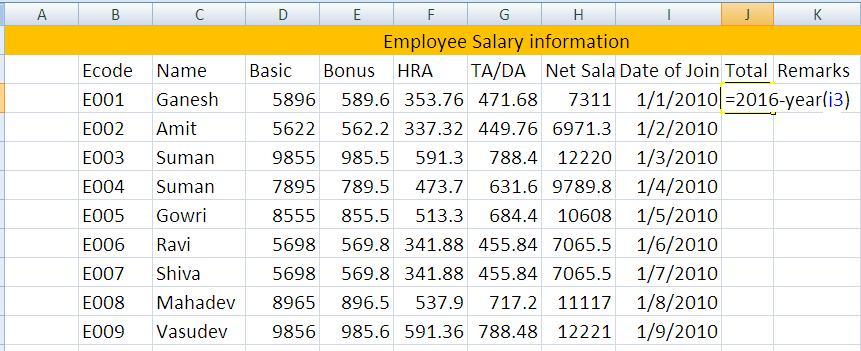
Step 8: To calculate Total Years of experience, just write the following equation to get it.


For Total Years of experience column, after getting result just right click and format cells and select number to get correct values.

That's all for now!

Mail merge using Microsoft Word

Mail merge is used to create personalized letters and pre-written addressed envelopes.

So one can send bulk emails or take prints without editing document.
Mail merge contains addresses and main letter.
Mail merge can be created using MS word and here are the steps to do same.

Step1: Create a sample letter as following.


Step2: Open MS Word

Step3: Go to “Mailings” Tab


Step4: Click on “Select Recipient”


Step5: Select “Type New List”


Step6: Enter address as following


Step7: Click on “Insert merge field”


Step8: Select Field name and their location to insert in.


Step9: Click on “Preview” button


After clicking on preview, you can see entered addresses, as following screen shot


PHP-Database Programs

Following are the various PHP  programs to demonstrate Database  connections.

1. PHP Program to demonstrates whether the connection to mysql database is active or not.
<?php
$dbhost = 'localhost';
$dbuser = 'root';
$dbpass = '';
$db = 'mars_db';
$conn = mysql_connect($dbhost,$dbuser,$dbpass);

if (!$conn)
{
die('Could not connect: ' . mysql_error());
}
else
{
echo 'Connected successfully';
}
?>

The above program will show following output.


2. PHP Program to create database from localhost.
<?php
$con=mysqli_connect("localhost","root","");

if (mysqli_connect_errno())
  {
  echo "Failed to connect to MySQL: " . mysqli_connect_error();
  }

$sql="CREATE DATABASE demo_12";

if (mysqli_query($con,$sql))
  {
  echo "Database demo_12 created successfully";
  }
else
  {
  echo "Error creating database: " . mysqli_error();
  }
?>

The above program produces following output.


3. PHP Program to create a table in database from localhost.
<?php
$con=mysqli_connect("localhost","root","","demo_12");

if (mysqli_connect_errno())
  {
  echo "Failed to connect to MySQL: " . mysqli_connect_error();
  }

$sql="CREATE TABLE emp_ret(FirstName CHAR(30),LastName CHAR(30),Age INT)";

if (mysqli_query($con,$sql))
  {
  echo "Table emp_ret created successfully";
  }
else
  {
  echo "Error creating table: " . mysqli_error();
  }
?>

The above program will have a following output.


4. PHP Program to connect MS Access Database using ODBC Data source. [Click here to create DSN (Data Source Naming) for MS Access.]
<html>
<body>
<h3 style="background-color:yellow"> Connecting to Ms 

Access Database using PHP </h3>
<hr>
<?php
$conn=odbc_connect('acc_php','','');
if (!$conn)
 {
exit("Connection Failed: " . $conn);
}
$sql="SELECT * FROM Cust";
$rs=odbc_exec($conn,$sql);

if (!$rs)
{
exit("Error in SQL");
}
echo "<table border=1><tr>";
echo "<th>Customer Code</th>";
echo "<th>Customer Name</th>";
echo "<th>Address</th></tr>";
while (odbc_fetch_row($rs))
  {
  $c_code=odbc_result($rs,"ccode");
  $c_name=odbc_result($rs,"cname");
  $c_addr=odbc_result($rs,"caddr");
  echo "<tr><td>$c_code</td>";
  echo "<td>$c_name</td>";
  echo "<td>$c_addr</td></tr>";
  }
odbc_close($conn);
echo "</table>";
?>
</body>
</html>

The above program produces following output.


That's all for now! for more PHP and MySQL programs click here

Responsibilities of a typical Web developer

Before we begin about responsibilities of web developer, let’s understand more about what are the skills and qualifications are required to become a web developer.


In web developing, various skills are required to master the huge world of web. Hence one needs to learn various technologies as following.
       
For Designing: HTML, HTML5, CSS, CSS5, Java script, Adobe Flash, Photoshop, Corel Draw, Dream Weaver  etc.

For Developing: Java script, PHP, MySQL (open source platform), Java(for secured websites) C# (for proprietary platform)

Formal education: Bachelor degree in Computer science is desirable but Post graduation in computer science is a big plus. Even diploma is also good for beginners.  

Formal education is only requirements in the Job market but to become freelancer web developer / blogger this is not required. Only experience and hard work matters a lot.         

As a web developer, designing is also plays most prominent role and they are responsible for look and feel of the website this requires understanding both graphic and programming expertise. Hence one needs to have sound knowledge of above web technology skills.

Responsibilities / Duties of the web developer:
A web designer / developer duties is to cover all aspects of creating and hosting website. Also requires meeting clients and their requirements.

Their duties includes following:
  • Writing code for designing (HTML/CSS)
  • Design of website layouts
  • Animation
  • Use of multimedia
  • CMS (Content Management System)
  • Video or Audio editing (if any)
  • Use of Multimedia programming
  • Analyzing technical requirements
  • Editing / Modifying
  • Testing
  • Solving day-to-day issues related to website.
  • Hosting and maintaining website.
Click here to learn HTML, Javascript, PHP etc.

Thank you for referring my blog!