Google search

Basic and advanced computer skills like Excel with macros, How to speed up your PC, C, CPP, Java programming, HTML, JavaScript, PHP, Wordpress, all web tools, Android tutorials, MySQL Tutorials, WAMP server installation. etc.

Fill values in combo box from MySQL using PHP

The below example shows that How to fill values in second combo box based on first combo box selected values from MySQL DB using PHP

1 Create a table called "Course" as following screen shot with insert few records as well in it.


2. Create another table called "Subjects" and add few records as following.


3. Now create "config.php" with following code in it.
<?php
      $host="localhost";
      $username="root";
      $password="";
      $dbname="demo";
      $con=mysql_connect("$host","$username","$password");
      mysql_select_db("$dbname",$con);
?>

In the above code please enter your database name, user name, password etc. 

4. Now create "cmb5.php" program with following code in it.
<?php
include('config.php');
?>
<html>
<head>
<script language="javascript">
    function showSub(catid)
 {
 document.frm.submit();
 }
</script>
</head>
<body>
<h2> Fill values in second combo box based on </br> first 

combo box values from MySQL DB using PHP </h2>
<hr color=red>
<?php error_reporting (E_ALL ^ E_NOTICE); ?>
<form action="" method="POST" name="frm" id="frm">
<table width="500" border="0">
  <tr bgcolor=silver>
    <td>Course</td>
    <td> <select name="course_id" id="course_id" 

onChange="showSub(this.value);">
       <option value="">--Select--</option>
       <?php
        $sql1="select * from course";
       $sql_row1=mysql_query($sql1);
       while($sql_res1=mysql_fetch_assoc($sql_row1))
       {
       ?>
       <option value="<?php echo $sql_res1["id"]; ?>" 

<?php if($sql_res1["id"]==$_REQUEST["course_id"]) { 

echo "Selected"; } ?>><?php echo 

$sql_res1["course_name"]; ?></option>
        <?php
        }
        ?>
       </select>
       </td>
  </tr>
  <tr bgcolor=silver>
    <td>Subjects</td>
    <td>
       <select name="sub_id" id="sub_id">
        <option value="">--Select--</option>
       <?php
       $sql="select * from subjects where 

cat_id='$_REQUEST[course_id]'";
       $sql_row=mysql_query($sql);
       while($sql_res=mysql_fetch_assoc($sql_row))
       {
       ?>
       <option value="<?php echo $sql_res["id"]; 

?>"><?php echo $sql_res["Sub"]; ?></option>
       <?php
       }
       ?>
    </select>
       </td>
  </tr>
</table>
</form>
</body>
</html>

5. Finally go for out put to see the above program. 


That's all for now, kindly subscribe us / comments your response!.

Thank you!


PHP-Pagination Example

The below example shows that how to retrieve records from MySQL Database using PHP Pagination technique. 

In the below example i included image along with text information. For image and text storing and retrieving you can click here and refer the same.

First of all create a php file called "pagination2.php" with following code in it. 
<html>
<head>
<title>Members Information Pagewise</title>
</head>
<body bgcolor=khaki>
<h1 align=center>Members Information Pagewise</h1>
<hr color=green>
<?php
$con = mysqli_connect('localhost','root','','demo');
//per page records
$per_page=1;
if (isset($_GET["page"])) {
$page = $_GET["page"];
}

else {
$page=1;
}

$start_from = ($page-1) * $per_page;

//Selecting the data from table with LIMIT
$query = "SELECT * FROM members2 LIMIT $start_from, 

$per_page";
$result = mysqli_query ($con, $query);
?>

<table align="center" border="1" cellpadding="4" 

cellspacing="4">
<tr bgcolor=white><th>Members 

Name</th><th>Qualification</th><th>Photo</th></tr>

<?php
while ($row = mysqli_fetch_assoc($result)) {
?>
<tr align="center" bgcolor=skyblue>
<td><?php echo $row['memname']; ?></td>
<td><?php echo $row['qual']; ?></td>
<td> <?php echo "<img src='uploaded/".$row['photo']."' 

height=100 width=100 />" ?> 

</tr>

<?php
};
?>
</table>

<div>
<?php

//select all records from members2 table in this example
$query = "select * from members2";
$result = mysqli_query($con, $query);

// Count the total records present in the table
$total_records = mysqli_num_rows($result);

//Function ceil to divide the total records on per page
$total_pages = ceil($total_records / $per_page);

//Lets go to first page , here you can use icons or text to 

give hyperlinks
echo "<center><a href='pagination2.php?page=1'>".'<img 

src=back.ico>'."</a>";

for ($i=1; $i<=$total_pages; $i++) {
echo "<a href='pagination2.php?page=".$i."'>".$i."</a> ";
};
// Lets move to last page
echo "<a 

href='pagination2.php?page=$total_pages'>".'<img 

src=next.ico>'."</a></center>";
?>
<hr color=green>
</div>
</body>
</html>

The output of the above program would produce following image.


Insert Image at server and data in to mysql database

This example shows you that how to insert an image to server (localhost) and its path and file name to database along with other text information using php script and mysql database.

Before we begin into programming, let's create a folder called "uploaded" at "wamp/www/your-web-directory" and it should appear like "wamp/www/your-web-directory/uploaded".

After creating folder, now go to mysql database and create a database called "demo" and table called "members2" with these columns and types in it. 

Table Name:  members2
Field names : memname, qual, photo, addrs, email.
Note. All field types should be varchar type and length you can set approximately 100 for each column.

The table should look as following screen shot.


Now create an HTML file for user to insert image with text. follow below example(addMem2.html).

1. addMem2.html
<html>
<body bgcolor=khaki>
<h1 align=center> Enter member information </h1>
 <form method="post" action="addMem2.php" enctype="multipart/form-data">
   <hr>
<center> 
<table border=1 cellpadding=8 cellspacing=8>
<tr>
<td> Enter Members Name: </td> <td> <input type="text" name="memname"/> </td> </tr>

<tr>
<td> Please Enter Qualification: </td> <td> <input type="text" name="qual"/> </td> </tr>

<tr>
<td> Select Photo: </td> <td>  <input type="hidden" name="size" value="350000">  <input type="file" name="photo"> <p> Less than 350KB only </p> </td> </tr> 

<tr>
<td> Address </td> <td><textarea rows="5" cols="35" name="addrs"> </textarea>   </td> </tr>

<tr>
<td>Email ID: </td> <td> <input type="text" name="email" size=30 />  </td> </tr>

<tr>
<td> <input TYPE="reset" name="can"  value="Reset"/> </td> 

<td> <input TYPE="submit" name="upload" title="Add Members Details" value="Add Member"/> </td>
</tr> </table>
</form>
</body>
</html>

output of the above page is as following..


2. Now create a file called "addMem2.php" (follow below code)
<?php
$target = '/wamp/www/advancedPHP/Uploaded/';
$target = $target . basename( $_FILES['photo']['name']);

$mname=$_POST['memname'];
$mqual=$_POST['qual'];
$mpic=(mysql_real_escape_string($_FILES['photo']['name']

));
$maddrs=$_POST['addrs'];
$memail=$_POST['email'];

$connection = mysqli_connect("localhost","root","");
if (!$connection) {
   die("Database connection failed: " . 

mysqli_connect_error());
}

$db_select = mysqli_select_db($connection, "demo");
if (!$db_select) {
die("Database selection failed: " . mysqli_connect_error());
}

// Entering information to the database
mysqli_query($connection,"INSERT INTO 

members2(memname,qual,photo,addrs,email) VALUES 

('$mname','$mqual','$mpic','$maddrs','$memail')") ;
// Stores the photo at server location
if(move_uploaded_file($_FILES['photo']['tmp_name'], 

$target))
{

// confirms you all is correct!
echo "<h1 align=center><font color=green>The Image ". 

basename( $_FILES['photo']['name']). " has been uploaded, 

and your information has been stored to the database. 

Thank you! </font> </h1>";
}
else {

echo "<h1 align=center><font color=red>Sorry, there was 

a problem uploading your file.</font> </h1>";
}
echo "<a href=show_mem.php> Show All Members </a>";
?> 

out put of the above php page is as following...
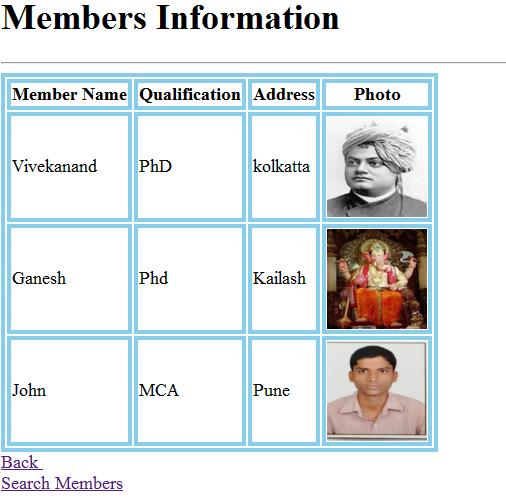
3. Now create one more page called "show_mem.php" with following code in it.
<html>
<head>
<style>
table, td, th {
    border: 4px solid skyblue;
}
</style>
</head>

<body background=bg.jpg>

<?php
$con=mysql_connect("localhost", "root", "");

if(!$con)
{
die('Couldnt connect to database:'.mysql_error());
}

mysql_select_db("demo", $con);

$result=mysql_query("select * from members2");

echo "<h1> Members Information </h1>";
echo "<hr>"; 
echo "<table border=1>";
echo "<tr>";
echo "<th> Member Name </th>";
echo "<th> Qualification </th>";
echo "<th> Address </th>";
echo "<th> Photo </th>";
echo "</tr>";

while($row=mysql_fetch_array($result))
{
echo "<tr>";
echo "<td>" .$row['memname']. "</td>";
echo "<td>" .$row['qual']. "</td>";
echo "<td>" .$row['addrs']. "</td>";
echo "<td>";
echo "<img src='uploaded/".$row['photo']."' height=100 width=100 />" ;
echo "</td>";
echo "</tr>";
}
echo "</table>";
mysql_close($con);
echo "<a href=addMem2.html>Back </a><br>";
echo "<a href=search_mem.html>Search Members </a>";
?>
</body>
</html>

output of the above program is...
Thank you for referring this example. Please leave your valuable feedback to improve my further blogs. 
Finally, don't forget to subscribe this site!!!..

internet connection status check

This java script example demonstrates that,  whether your browser is online or offline.
<html>
<head>
</head>
<body>
<h1> Check internet connection status </h1>
 <script>
    function status()
    {
        if(navigator.onLine)
        {
alert("You are Online!")
}
        else
        {
alert("You are Offline!")
        }
    }

</script>
<button onclick="status();">check internect connection 

status </button>
<br>
<h1> This is refresh code </h1>
<a href="javascript:location.reload(true)">Refresh 

Now!</a>
</script>
</body>
</html>

Out put of the above code is : 


MIT India Tech Blog: Work from home

MIT India Tech Blog: Work from home: To make money online or work from home, here are some simple steps to make extra earning for you.  1. Blogging : if you are good at wr...

Work from home

To make money online or work from home, here are some simple steps to make extra earning for you. 


1. Blogging : if you are good at writing articles or post. 
try www.blogspot.com or www.wordpress.com
You can write article/post on technical, non-technical, political, sports, science, fiction etc.  

2. Online share trading: this requires lot of market watch and analysis to buy and sell shares.
Before stepping into trading, one should study ABC of share market. You can refer this link: www.moneycontrol.com  for more detail.

3. Freelancing: if you are good at programming or computer related work then try registering on https://www.freelancer.com or https://www.upwork.com to make good and steady income.

The jobs available at these sites are.

  • a) Web Designer/Developers: This requires strong knowledge of particular technical skills like web technologies (HTML5,PHP, MySQL, Wordpress, Java etc)
  • b) Programmers: C, C++, Java etc
  • c) Macro Programmer : Excel Macros with VB coding.
  • d) Accounting : Tally / CIMA expert / Auditing  etc.
  • e) Network engineers: CISCO tools /  Microsoft tools.
  • f) Database admin: MS-SQL, Oracle, MySQL or any RDBMS.
  • g) Online help desk: Basic computer, Ms Office, internet and good communication skills are mandatory.
  • h) Call center executive: Good command over spoken and written English with computer skills.
  • i) Digital Marketing Executive: one should know SEO marketing tools with advertising on social media like facebook, twitter, linkedin, google+, pintrest etc.


4. Affiliate marketing: if you have a website or a blog try inserting affliliate links to them and earn some extra bucks.
exa: amazon affiliate [is best one.]

5. Email marketing: if you know how to send bulk emails on behalf of your clients then this is good idea to earn money.

6. There 7 Benefits of Working From Home

CPP Basic Programs-List1

Following are the list of C++ Programs.
1. C++ Program to display employee salary information. 
#include<iostream.h>
#include<conio.h>
class test
{
public:
int bs, hra, pf, net;

getdata(int bs1, int hra1, int pf1)
{
bs=bs1;
hra=hra1;
pf=pf1;
net=bs+hra-pf;
return(net);
}

void display()
{
cout <<"Net Salary="<<net;
}
};

main()
{
clrscr();
test t;
t.getdata(10000,3000, 1500);
t.display();
}

2. C++ Program to add 2 numbers.
#include<iostream.h>
#include<conio.h>
void main()
{
int a,b;
clrscr();
cout<<"\nEnter two numbers:";
cin>>a>>b;
int sum=a+b;
cout<<"\nResult="<<sum;
getch();
}

3. C++ Program to display square and cube of entered number.
#include<iostream.h>
#include<math.h>
#include<conio.h>
main()
{
int num;
clrscr();
cout<<"\nEnter number:";
cin>>num;
cout<<"\nSquare of the given number="<<num*num;
cout<<"\nCube of the given number="<<num*num*num;
cout<<"\nSquare root of the given number="<<sqrt(num);
getch();
}

4. C++ Program to show inventory information. 
#include<iostream.h>
#include<conio.h>
main()
{
int qty;
char itemnm[15];
float price,tot;
clrscr();
cout<<"\nEnter item name:";
cin>>itemnm;
cout<<"\nEnter qty:";
cin>>qty;
cout<<"\nEnter price:";
cin>>price;
tot=qty*price;
clrscr();
cout<<"\n=====BILL=====";
cout<<"\nItem name:"<<itemnm;
cout<<"\nQty      :"<<qty;
cout<<"\nPrice    :"<<price;
cout<<"\nTotal Amt:"<<tot;
cout<<"\n==============";
getch();
}

5. C++ program to display addition and multiplication using switch case.
#include<iostream.h>
#include<conio.h>
main()
{
int a,b,ch;
clrscr();
cout<<"\n1.Addition";
cout<<"\n2.Multilplication";
cout<<"\nEnter choice:";
cin>>ch;
switch(ch)
{
case 1:
cout<<"\nResult="<<a+b;
break;
case 2:
cout<<"\nResult="<<a-b;
break;
default:
cout<<"\nInvalid choice";
break;
}
getch();
}

6. C++ Program to use goto statement.
#include<iostream.h>
#include<conio.h>
main()
{
int i;
clrscr();
for(i=1;i<=10;i++)
{
if(i==5)
goto a;
cout<<"\nI="<<i;
}
a:
cout<<"\nProgram terminated";
getch();
}

7. C++ Program to display smallest and largest number.
#include<iostream.h>
#include<conio.h>
main()
{
int num[10];
int range;
clrscr();
cout<<"\nEnter range:";
cin>>range;
cout<<"\nEnter "<<range<<" numbers:";
for(int i=0;i<range;i++)
cin>>num[i];
cout<<"\nThe given numbers are:";
for(i=0;i<range;i++)
cout<<"\n"<<num[i];
int big,small;
big=num[0];
small=num[0];
for(i=1;i<range;i++)
{
if(num[i]>big)
big=num[i];
else if(num[i]<small)
small=num[i];
}
cout<<"\nLargest number="<<big;
cout<<"\nSmallest number="<<small;
getch();
}

8. C++ Program to swap 2 numbers using function.
#include<iostream.h>
#include<conio.h>
swap(int,int);

main()
{
int a,b;
clrscr();
cout<<"\nEnter two numbers:";
cin>>a>>b;

cout<<"\nBefore calling the function";
cout<<"\nA="<<a;
cout<<"\nB="<<b;

swap(a,b);
cout<<"\nAfter calling the function";
cout<<"\nA="<<a;
cout<<"\nB="<<b;
getch();
}

swap(int a,int b)
{
int temp=a;
a=b;
b=temp;
cout<<"\nInside the function";
cout<<"\nA="<<a;
cout<<"\nB="<<b;
}

9. C++ Program to find length of the string.
#include<iostream.h>
#include<conio.h>
#include<string.h>
main()
{
char str[25];
int i,len=0;
clrscr();
cout<<"\nEnter string:";
cin>>str;
for(i=0;str[i]!='\0';i++)
{
len++;
}
cout<<"\nLength of the string="<<len;
getch();
}

10. C++ Program to calculate electricity bill. 
#include<iostream.h>
#include<conio.h>
class EBill
{
 int meterno,units,tot;
 char cnm[15];
 public:
 void getInfo()
 {
  cout<<"\nEnter customer name:";
  cin>>cnm;
  cout<<"\nEnter number of units used:";
  cin>>units;
  cout<<"\nEnter meter number:";
  cin>>meterno;
 }
 void calc()
{
 if(1<= units<=150)
 tot=units*2+100;
 else if(150< units<=300)
 tot=units*3+100;
 else if(300< units<=400)
 tot=units*4+100;
 else
 tot=units*5+100;
}
void showBill()
{
cout<<"\n=====Electricity BILL======";
cout<<"\nCustomer name="<<cnm;
cout<<"\nNo. of Units ="<<units;
cout<<"\nMeter number ="<<meterno;
cout<<"\nTotal Bill   ="<<tot;
cout<<"\n================";
}
};
main()
{
clrscr();
EBill ob;
ob.getInfo();
ob.calc();
ob.showBill();
getch();
}

Thank you for referring above programs. 
keep subscribe to latest and updated programs.